

|
Name |
Print Photos |
|---|---|
|
Google Play Link |
GET IT ON
Google Play
|
|
Category |
Photography |
|
Developer |
BitFlap LLC |
| Last version | 1.1.0 |
|
Updated |
|
|
Compatible with |
Android 7.1+ |
Introduction to Print Photos APK
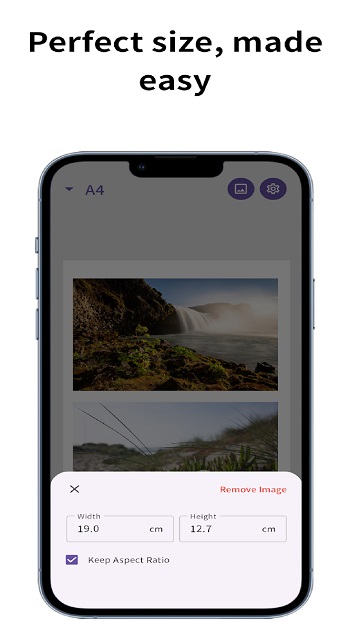
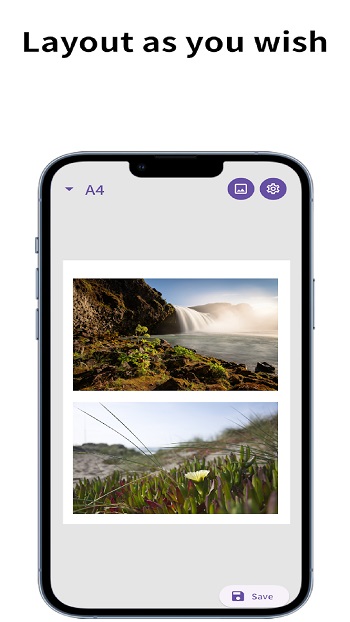
Print Photos is a photo printing app built for people who need exact image sizes on standard paper. It focuses on practical jobs like passport photos, wallet prints, ID pictures, and simple photo sheets for home use. The main idea is clear from the start: pick a paper size, set the photo dimensions, arrange the images, and save a file that is ready to print.
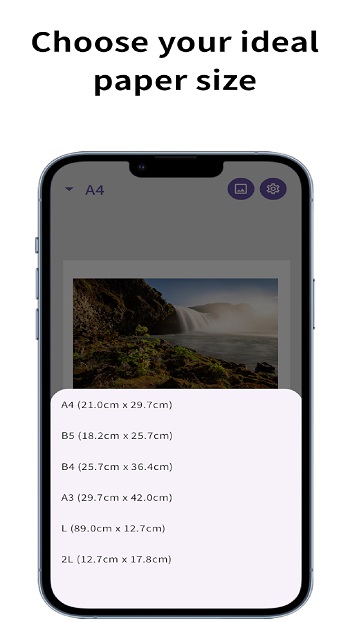
The app is used for preparing photos before printing, especially when size matters. You can choose common paper formats such as A4, A5, B4, B5, Letter, and Legal, then place one or several photos on the page. That makes it useful for school projects, document photos, craft work, and quick home printing when you do not want random scaling to ruin the result.
One of its strongest points is the way it handles exact dimensions. Users can set measurements in inches or centimeters, which helps when printing passport or visa photos that need a specific format. There are also ready-made presets for common use cases, so you do not have to guess the size or do mental math before printing. That alone can save a lot of trial and error, and probably a few sheets of paper too.
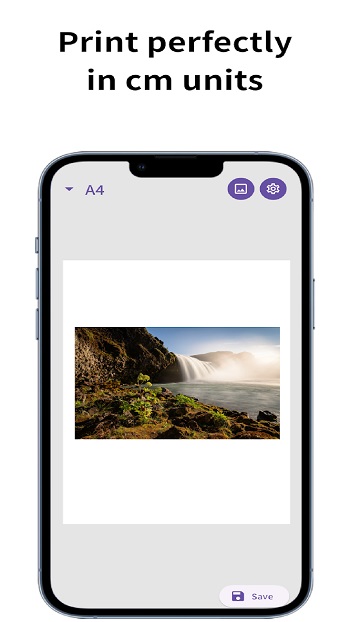
The layout tools add another layer of convenience. You can resize, rotate, and arrange photos on a page with grid-based alignment, which helps keep everything neat. This is handy for people printing multiple copies on one sheet, like wallet-size pictures or small photo sets for forms and portfolios. The export option also matters here, since the app saves high-resolution PNG files that are easier to print clearly.
For everyday users, the app’s biggest advantage is simplicity. It turns a task that often feels oddly annoying into a short step-by-step process. Parents can print school photos at home, students can prepare visuals for assignments, and travelers can sort out document photos without running to a studio for every small update. It also helps reduce wasted paper by fitting multiple images on a single page.
There are a few limitations to keep in mind. The app is focused on print layout, so people looking for advanced photo editing may find it basic. The export format is centered on PNG output, which is fine for many users but may feel limited for those who want more file options. It also depends on your printer and paper settings to get the final result exactly right, so some testing may still be needed the first time.
FAQs Print Photos
What is Print Photos used for?
+
Print Photos is used to create print-ready photo layouts in exact sizes for passport photos, wallet prints, ID pictures, school work, and simple home photo sheets.
Does Print Photos support standard paper sizes?
+
Yes. The app supports standard paper formats such as A4, A5, B4, B5, Letter, and Legal, so users can prepare layouts that match common printers.
Can Print Photos make passport and visa photos?
+
Yes. It includes size presets for passport, visa, and ID photos, which helps users prepare images in the correct format before printing at home.
Can I place multiple photos on one page in Print Photos?
+
Yes. The app lets you arrange several photos on one sheet, which is useful for wallet prints, contact-style sheets, crafts, and saving paper.
Who should use Print Photos?
+
Print Photos is a good fit for parents, students, travelers, crafters, and office users who need quick control over photo size and page layout without complicated editing tools.
Discover More Interesting Apps
-

Perfect Print
v1.1.0
48.38 Mb
Updated -
Mod
Beauty Cam
v13.3.75
219.52 Mb
Updated -
Mod
Meitu
v12.20.6
475.73 Mb
Updated -
Mod
Timemark
vv10.0.281
138.00 Mb
Updated -
Mod
Remini
v3.7.1472.202526272
249.64 Mb
Updated -
Mod
PhotoRoom
v2026.43.02
240.35 Mb
Updated -
Mod
Retake AI
v4.2.1
153.81 Mb
Updated -
Mod
Beauty Plus
v7.48.1
529.97 Mb
Updated -
Mod
Hypic
v9.7.0
213.51 Mb
Updated -
Varlens Pro
v5.4
306.49 Mb
Updated






Share Your Thoughts